Diving Deep into the Rayneo Air 3S: Is This the Future of Personal Displays?
Hey everyone! You know that feeling when a new piece of tech lands on your desk and you just *know* it’s going to change something? That’s exactly how I felt when the Rayneo Air 3S arrived. For ages, I’ve been fascinated by the idea of wearable displays – something that could give me a giant screen experience without lugging around a monitor or straining my eyes on a tiny phone. I’ve tried a few things in the past, some promising, some… not so much. But the buzz around the Rayneo Air 3S was different, so I decided to dive in headfirst and see if it could truly deliver on its promise.
After weeks of putting it through its paces in various scenarios, from chilling on the couch to being crammed in an airplane seat, I’m genuinely excited to share my full, unfiltered experience. If you’ve been curious about smart glasses or are just looking for a more immersive, portable screen solution, stick around. This one might just surprise you.
You can check out the official Rayneo Air 3S website right here to see more details: Visit Official Rayneo Air 3S Website Now
First Impressions: Unboxing and Initial Setup
When the package arrived, I was immediately struck by the sleek, minimalist design of the box itself. It felt premium, which is always a good sign. Opening it up, the Rayneo Air 3S glasses were nestled securely, looking surprisingly like a stylish pair of regular sunglasses, albeit a touch thicker. This was a huge relief, as some smart glasses I’ve seen in the past tend to lean heavily into the „futuristic gadget“ aesthetic, which isn’t always practical for everyday wear.
The unboxing process was straightforward. Inside, I found the glasses, a detachable USB-C cable (which is key for compatibility), various nose pads for a custom fit, a cleaning cloth, and a pretty nice carrying case. The case feels sturdy and compact enough to toss into a backpack without worrying about damaging the glasses.
Setting them up was as simple as plugging them into my phone’s USB-C port. Seriously, that was it. No complicated apps to download, no lengthy pairing processes. My phone immediately recognized them as an external display, and within seconds, I had a giant, vibrant screen floating before my eyes. The „wow“ factor was instant and profound. It wasn’t just a small projection; it felt like looking at a massive TV screen a few feet away. This immediate, plug-and-play functionality is a massive win for the Rayneo Air 3S, making it incredibly user-friendly right out of the box.
The Display: My Personal Cinema on the Go
Let’s talk about the main event: the display. Rayneo claims a 130-inch virtual screen from 4 meters, and while „virtual screen size“ can sometimes feel a bit abstract, with the Rayneo Air 3S, it genuinely feels expansive. I’d compare the experience to sitting in the middle row of a movie theater, completely immersed.
The resolution, a crisp 1080p for each eye, combined with a 120Hz refresh rate, makes everything incredibly smooth. Text is sharp, videos play without a hitch, and games feel responsive. I spent an entire evening binging a new series on a streaming service, and I completely forgot I was wearing glasses. The colors are punchy and vibrant, and the contrast is surprisingly good, even in a moderately lit room. There’s a noticeable lack of pixelation or screen-door effect, which is often a concern with head-mounted displays.
Brightness is adjustable, and I found it perfectly adequate for indoor use and even in some shaded outdoor environments. Direct sunlight, as with most displays, is a challenge, but that’s not really the primary use case for these anyway. What impressed me most was the consistency of the image quality across the entire field of view – no blurry edges or distortion, which can break immersion quickly. This is where the Rayneo Air 3S truly shines; it delivers a consistently high-quality visual experience.
A friend of mine, who usually scoffs at new tech, tried them out. „Honestly, I thought it would be a gimmick,“ he told me later, „but watching that movie felt like I was in my own private cinema. The picture quality is genuinely impressive for something so small.“ That’s a sentiment I’ve echoed multiple times.
Comfort and Design: Wearability for Hours
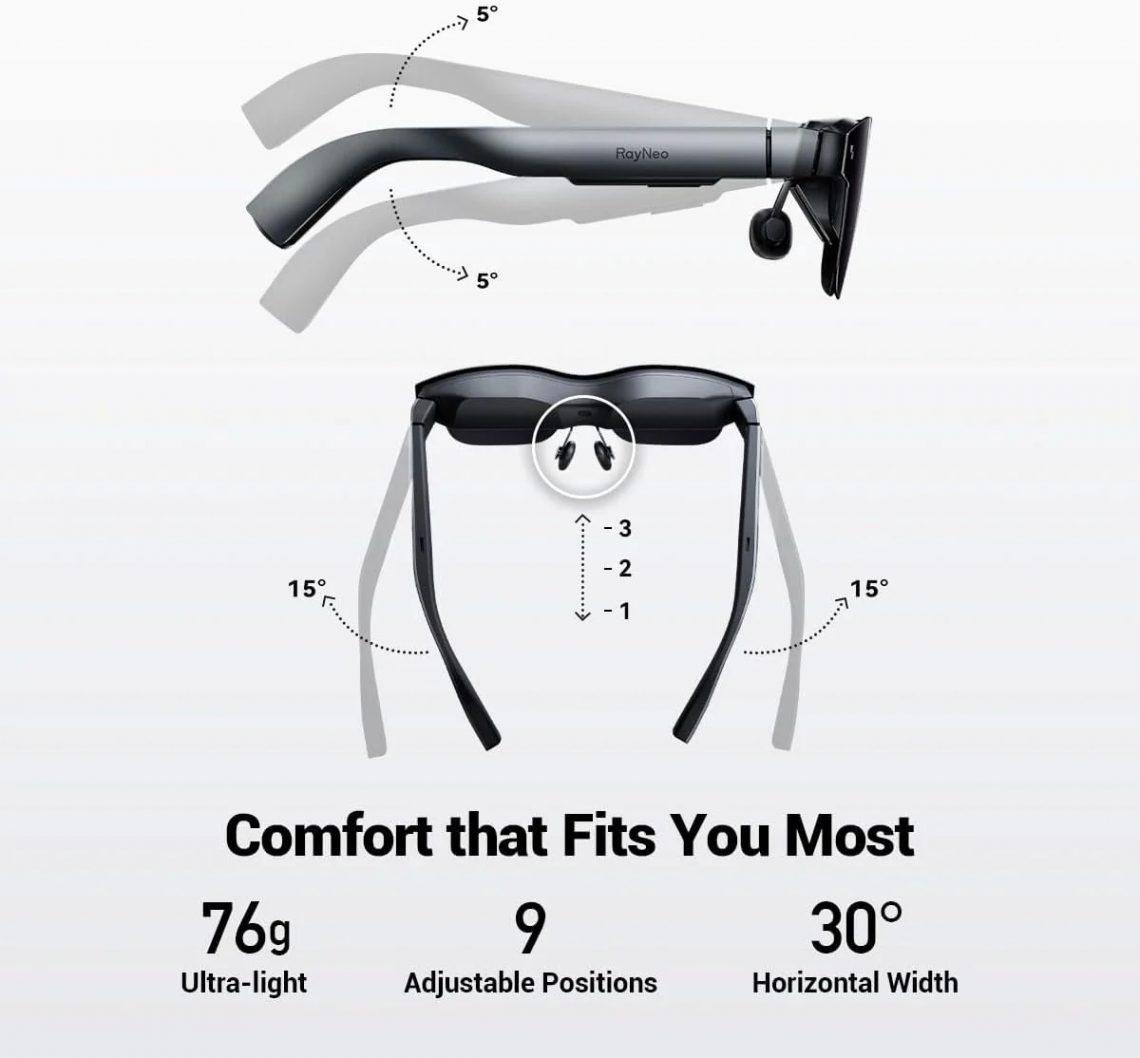
For a device you wear on your face, comfort is paramount. The Rayneo Air 3S, thankfully, gets this right. Weighing in at just under 75 grams, they feel light enough for extended wear. I’ve worn them for 2-3 hour movie sessions and even longer productivity stints without significant discomfort.
The design is sleek and understated. They don’t scream „I’m wearing smart glasses!“ which is a big plus for public use. The arms are sturdy but flexible, and the overall build quality feels robust. Rayneo includes different sized nose pads, which are easy to swap out. This is a crucial detail, as a poor nose pad fit can make glasses unwearable. I found the default ones worked well for me, but it’s great to have options.
The temples house the integrated speakers, and they taper nicely without feeling bulky. They sit comfortably behind my ears, and I didn’t experience any pressure points. The ability to swap out the front lens for prescription lenses (through an optician, naturally) is also a thoughtful addition for those of us who need corrective vision.
Sound and Immersion: A Complete Experience
While the visual display is the star, audio is essential for true immersion. The Rayneo Air 3S features open-ear speakers integrated into the temples. These speakers offer decent sound quality for personal listening, especially for dialogue in movies or casual browsing. They’re designed to keep you aware of your surroundings, which is great for public spaces or if you need to hear what’s happening around you.
However, if you’re looking for a truly immersive, bass-thumping audio experience – say, for an action movie or intense gaming – you’ll want to pair them with your favorite Bluetooth headphones or earbuds. The glasses simply pass through the audio from your connected device, so whatever sound solution you prefer can be easily integrated. For most of my use, the built-in speakers were perfectly fine, offering clear audio that didn’t disturb anyone else nearby.
Connectivity and Versatility: Plugging Into My World
This is where the Rayneo Air 3S really shines as a practical tool. Its USB-C display port connectivity means it’s incredibly versatile. I’ve successfully connected it to:
* **My Android phone:** Instant big screen for YouTube, Netflix, social media, and even mobile gaming. It felt like I was holding a small controller while a massive screen floated in front of me.
* **My MacBook Air:** Using it as a secondary monitor for productivity tasks was surprisingly effective. Having an extra virtual screen for Slack or emails while my main laptop screen was dedicated to coding or writing was a game-changer for working in coffee shops.
* **My iPad Pro:** Again, extending the display for drawing apps or media consumption was fantastic.
* **My Nintendo Switch (with an adapter):** Gaming on a massive, personal screen was an absolute blast. The low latency and high refresh rate made it feel incredibly responsive.
The beauty of the Rayneo Air 3S is its simplicity. If your device supports USB-C DisplayPort output, it’s pretty much guaranteed to work. There are no proprietary connectors or confusing software to navigate. This universal compatibility makes it a truly versatile piece of tech, deserving of a look at their official site: Visit Official Rayneo Air 3S Website Now.
„I use my Rayneo Air 3S almost daily with my Samsung phone,“ commented one user online. „It’s perfect for watching shows during my commute without bothering anyone. The picture is super clear.“ Another reviewer mentioned, „Hooking it up to my Steam Deck was surprisingly easy, and it totally changes the gaming experience on the go.“
My Use Cases: Where the Rayneo Air 3S Really Shines
I’ve put the Rayneo Air 3S through a variety of real-world scenarios, and here are some of my favorite ways I’ve integrated it into my routine:
* **Travel Companion:** This is arguably where it shines brightest for me. On a recent flight, instead of craning my neck at a tiny seat-back screen or juggling my phone, I popped on the Rayneo Air 3S. It felt like I had a full-sized tablet right in front of my face, allowing me to fully recline and relax while watching a movie. The immersive experience genuinely made the long flight fly by. It’s also fantastic for train rides or just lounging in a hotel room.
* **Personal Entertainment Hub:** Whether it’s catching up on YouTube videos, streaming movies, or even just browsing Reddit in bed, the Rayneo Air 3S transforms mundane viewing into an event. It frees up my hands and lets me find a comfortable position without worrying about screen angles.
* **Light Productivity:** As mentioned, using it as an extended display for my laptop was a revelation for remote work. For tasks that don’t require super-fine detail or extensive mouse interaction (like managing emails, monitoring chat, or reviewing documents), it provides a valuable second screen without the bulk. I wouldn’t edit photos on it, but for text-based work, it’s surprisingly capable.
* **Casual Gaming:** While I typically game on a PC, connecting the Rayneo Air 3S to my Switch or even my phone for some cloud gaming was a lot of fun. The large, clear display makes smaller details pop, and the 120Hz refresh rate is a noticeable advantage for smoother gameplay.
Battery Life: It’s All About Your Source
Since the Rayneo Air 3S itself doesn’t have an internal battery (it draws power from the connected device), its „battery life“ is entirely dependent on what you plug it into. This is both a pro and a con.
The „pro“ is that the glasses are lighter and don’t need their own charging cycle. The „con“ is that they will drain the battery of your phone, laptop, or gaming console. In my testing, an hour of video streaming would typically drain my phone’s battery by about 10-15% more than just watching on the phone screen itself. This isn’t terrible, but it’s something to be aware of for extended sessions. For most scenarios, especially if you have access to a power bank or a charging port, it’s a non-issue. For instance, on a long flight, I’d bring a power bank to keep my phone topped up while watching movies.
One user noted, „It definitely draws power from my phone, but a small portable battery pack solves that easily. The trade-off for such a big screen experience is worth it.“
Potential for Growth: What I’d Love to See Next
While the current plug-and-play simplicity of the Rayneo Air 3S is a huge strength, I can’t help but dream about future iterations. Imagine if it had a small, internal battery for truly wire-free casual use, even if just for an hour or two. Or perhaps deeper integration with a companion app for more nuanced display settings or even basic AR overlays, though I understand that moves it into a different product category. For now, its focused purpose as a superior portable display is what makes it so good.
Who Is the Rayneo Air 3S For?
I think the Rayneo Air 3S is perfect for several groups of people:
* **Frequent Travelers:** If you spend a lot of time on planes, trains, or even just in hotels, this is a game-changer for entertainment.
* **Commuters:** Make your daily bus or subway ride more enjoyable with a personal movie theater.
* **Media Enthusiasts:** Anyone who loves watching movies, TV shows, or YouTube videos and wants a more immersive, comfortable experience than a phone or tablet.
* **Casual Gamers:** Especially those with portable consoles like the Nintendo Switch or Steam Deck, or who enjoy mobile/cloud gaming.
* **Students/Remote Workers:** For light productivity tasks where an extra screen is beneficial, without the bulk of a traditional monitor.
* **Privacy Seekers:** Want to watch something personal without everyone around you seeing? The Rayneo Air 3S keeps your screen completely private.
If any of these resonate with you, the Rayneo Air 3S is definitely worth exploring further.
Final Thoughts: A Glimpse into the Future, Today
The Rayneo Air 3S has genuinely impressed me. It delivers on its promise of a massive, immersive display in a lightweight, comfortable, and remarkably simple package. It’s not trying to be a full-blown AR headset or replace your entire computer; it’s focused on being an excellent portable screen, and in that, it utterly succeeds.
It’s the kind of tech that, once you try it, you wonder how you managed without it, especially for travel or just unwinding with a movie. The clarity, the vibrant colors, the fluid motion – it all adds up to an exceptional viewing experience. If you’re in the market for a truly personal, portable, big-screen solution, I wholeheartedly recommend giving the Rayneo Air 3S a serious look. It’s definitely earned a permanent spot in my tech bag.
Ready to experience your digital world on a massive, personal screen?
Visit Official Rayneo Air 3S Website Now
One last piece of feedback I saw from a user truly sums it up: „I was skeptical about smart glasses, but the Rayneo Air 3S just works. Plug it in, and boom, you’ve got a giant display. It’s surprisingly practical and way more comfortable than I expected. Definitely a solid purchase.“ I couldn’t agree more.
Visit Official Rayneo Air 3S Website Now and explore the possibilities!


Das könnte dich auch interessieren

Schlechtester Service ever? Mein Erlebnis in Frankfurt

Wo Kinder kostenlos reisen: Spartipps für Familien